TL;DR. Audio fingerprinting turns a recording into a compact, unique digital signature and matches it against a database to name the exact song, artist and version. It's how Shazam identifies a track in seconds. It only works on recordings it has already indexed, and it answers "which recording is this?" It does not answer "what genre is this?" That is a different problem, solved by AI classification.
What is audio fingerprinting?
Audio fingerprinting is a technique that reduces a piece of audio to a small, robust digital signature, an "acoustic fingerprint," that uniquely identifies that specific recording. Just as a human fingerprint identifies one person, an acoustic fingerprint identifies one master recording. The fingerprint is derived from the most stable, recognizable features of the sound, so it survives background noise, compression, phone-speaker playback and volume changes.
When you hold up your phone in a cafe and ask an app what is playing, it is not "understanding" the music. It is capturing a few seconds of audio, computing a fingerprint from that snippet, and looking that fingerprint up in a massive index of pre-computed fingerprints for known recordings. If it finds a match, it returns the exact title, artist and release. This is recognition, not comprehension, and that distinction matters enormously.
How Shazam-style fingerprinting works
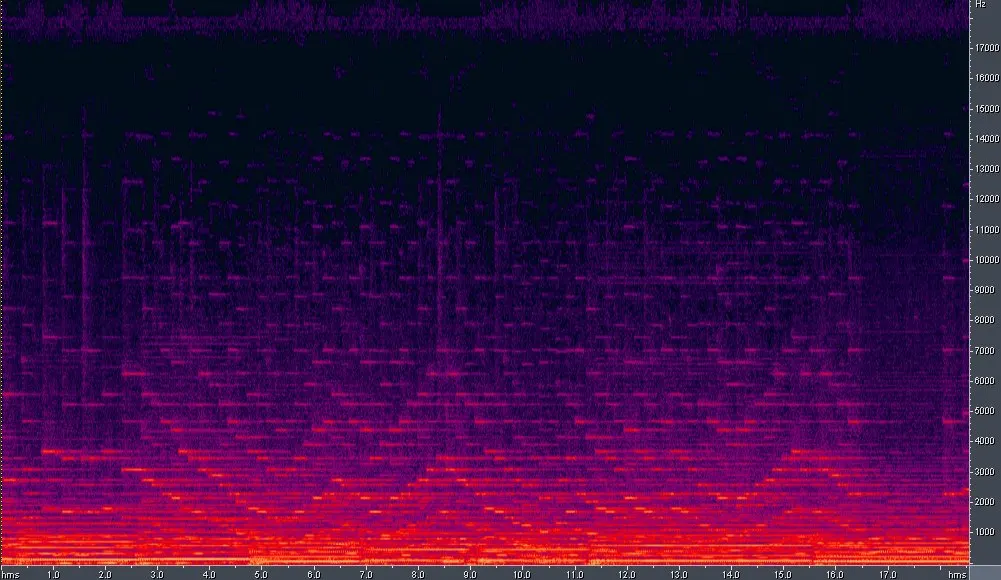
The classic Shazam approach, published by Avery Wang in 2003, is elegant. First, the app converts the audio snippet into a spectrogram, a picture of how energy is distributed across frequencies over time. Then it finds the "peaks" in that spectrogram, the loudest, most prominent points that are least likely to be masked by noise. These peaks form a constellation of points that is remarkably stable even in a noisy room.
Next, the algorithm pairs nearby peaks together and hashes each pair, along with the time gap between them, into a compact number. Those hashes are the fingerprint. Because the same song always produces the same constellation of peaks, it always produces the same hashes, which the service has already stored for every track in its catalogue. Matching becomes a fast database lookup: find recordings that share a run of hashes at consistent time offsets, and you have your song, usually in under a second.
The genius is robustness. Even if the recording is quiet, distorted, or buried under conversation, enough spectral peaks survive to produce matching hashes. That is why Shazam can identify a track from a tinny speaker across a loud bar. But that same design carries a hard limitation, which is the key to understanding what fingerprinting can and cannot do.
The catch: fingerprinting only knows what it has indexed
An acoustic fingerprint matches one specific recording. A live version, a remix, a cover, an acoustic re-record or a slightly different master will each produce a different fingerprint from the studio original. If a recording is not in the database, fingerprinting returns nothing at all, even if the song is world-famous. It cannot generalize.
This is exactly why a Shazam-style tool is useless for a brand-new, unreleased or AI-generated track. If you produced a song last night, or a model generated it this morning, no fingerprint exists for it, so no fingerprinting service can name it. And crucially, fingerprinting can tell you a track is "Strobe by deadmau5" but it cannot tell you that Strobe is progressive house. Identity and genre are two separate questions.

Audio fingerprinting vs genre classification
People conflate these two because both start with audio, but they solve opposite problems. Fingerprinting asks "which exact recording is this?" and needs a prior match to succeed. Genre classification asks "what kind of music is this?" and works on anything, including audio it has never encountered, because it learns the general characteristics of a style rather than memorizing a specific file.
| Aspect | Audio fingerprinting (Shazam) | Genre classification (AI) |
|---|---|---|
| Question answered | Which exact recording is this? | What style / genre is this? |
| Needs a prior match | Yes, must be in the database | No, works on unseen audio |
| Works on new / unreleased tracks | No | Yes |
| Works on AI-generated tracks | Only if already indexed | Yes |
| Handles covers & remixes | Sees them as different recordings | Classifies by sound regardless |
| Output | Title, artist, exact version | Genre label + confidence |
| Core method | Spectral peak hashing + lookup | Learned embeddings / neural net |
Where each one is the right tool
Fingerprinting is the right tool when you hear a finished, released song and want to know its name, or when a platform needs to detect duplicate uploads and enforce copyright via Content ID. It is a matching problem, and fingerprinting is superb at it. Streaming royalty systems, radio-play monitoring and rights enforcement all lean on fingerprinting.
Genre classification is the right tool when identity is unknown or irrelevant and you care about the sound itself. A producer tagging an unreleased track, a distributor sorting a catalogue, a DJ organizing crates by style, or anyone dealing with the wave of AI-generated music (Deezer reported roughly 44% of daily uploads were AI-generated in 2026) needs classification, not fingerprinting, because there is no fingerprint to match. For a deeper head-to-head, see our comparison of an AI genre detector vs Shazam, and our explainer on how AI music genre detection works.
Why this matters for AI music in 2026
The rise of AI-generated tracks has made the gap between these two technologies impossible to ignore. When Suno or Udio generates a song, it has no fingerprint and no metadata, so a recognition app draws a blank. But to distribute that track on Spotify, Apple Music or through DistroKid, you still need to tag its genre correctly, because genre drives playlisting, discovery and recommendations. A wrong or missing genre buries the release.
That is where classification earns its keep. Whether your track is techno, trap or ambient pop, you can run it through our AI music detector to get an objective genre label with a confidence score before you upload, no prior match required. It reads the sound directly, which is exactly what fingerprinting cannot do.
FAQ
Is audio fingerprinting the same as Shazam?
Shazam is the most famous product built on audio fingerprinting, but the technique is broader. Services like ACRCloud, Apple's own systems and YouTube Content ID all use acoustic fingerprinting to match recordings. Shazam popularized the approach with its spectral peak-hashing method published in 2003.
Can audio fingerprinting identify the genre of a song?
No. Fingerprinting matches a snippet to an exact known recording and returns its title and artist, not its genre. Naming the style of a track, especially an unreleased or AI-generated one, is a separate problem solved by AI genre classification, which reads the sound rather than looking up a stored fingerprint.
Why can't Shazam recognize my own new track?
Because fingerprinting only works on recordings already in its database. A brand-new, unreleased or AI-generated track has no stored fingerprint, so there is nothing to match against. To label such a track by style, use a genre classifier that works on unseen audio.
Does fingerprinting work on covers and remixes?
Generally no. A cover, live version or remix is a different recording with a different acoustic fingerprint, so it will not match the studio original. It would only be recognized if that specific version had been separately indexed. Genre classification, by contrast, judges any version by its sound.
Have a track with no fingerprint to look up, like an unreleased or AI-generated song? Run it through our AI music detector to get its genre and a confidence score before you distribute it.